Multi-node and Multi-network Tests
NixOS integration tests excel at orchestrating complex network setups with multiple machines and networks.
Two Nodes on the Same Network
By default, nodes in a test can communicate with each other using their hostnames.
In this example, we let two machines ping each other:

Run this example test yourself
To run this test directly from the example repository, run:
{
  name = "ping test";

  nodes = {
    machine1 = { };
    machine2 = { };
  };

  defaults = {
    # ongoing discussion if this should be default in the test driver
    networking.dhcpcd.enable = false;
  };

  globalTimeout = 30;

  testScript = ''
    start_all()

    # First, start network-online.target
    machine1.systemctl("start network-online.target")
    machine2.systemctl("start network-online.target")

    # Wait for the network to be online
    # Otherwise, we could get errors like
    #   `ping: connect: Network is unreachable`
    machine1.wait_for_unit("network-online.target")
    machine2.wait_for_unit("network-online.target")

    machine1.succeed("ping -c 1 machine2")
    machine2.succeed("ping -c 1 machine1")
  '';
}
Using Multiple Networks (VLANs)
You can isolate nodes into different networks by using the virtualisation.vlans option (see also official docs).
In this example, we set up two networks with 3 machines, but without routing. Then, we let them ping each other:

Run this example test yourself
To run this test directly from the example repository, run:
{
  name = "multi-network test";

  nodes = {
    machine1 = {
      virtualisation.vlans = [ 1 ];
    };
    machine2 = {
      virtualisation.vlans = [
        1
        2
      ];
    };
    machine3 = {
      virtualisation.vlans = [ 2 ];
    };
  };

  defaults = {
    # ongoing discussion if this should be default in the test driver
    networking.dhcpcd.enable = false;
  };

  globalTimeout = 30;

  testScript = ''
    start_all()

    # First, start network-online.target
    machine1.systemctl("start network-online.target")
    machine2.systemctl("start network-online.target")
    machine3.systemctl("start network-online.target")

    # Wait for the network to be online
    # Otherwise, we could get errors like
    #   `ping: connect: Network is unreachable`
    machine1.wait_for_unit("network-online.target")
    machine2.wait_for_unit("network-online.target")
    machine3.wait_for_unit("network-online.target")

    # the neighboring nodes should be able to ping each other
    machine1.succeed("ping -c 1 machine2")
    machine2.succeed("ping -c 1 machine1")

    machine2.succeed("ping -c 1 machine3")
    machine3.succeed("ping -c 1 machine2")

    # As we have no routing setup, 1 and 3 should not be able to ping each other
    machine1.fail("ping -c 1 machine3")
    machine3.fail("ping -c 1 machine1")
  '';
}
VLANs are a powerful way to test complex network architectures like firewalls, routers, and isolated service enclaves.
The Bittorrent test in nixpkgs
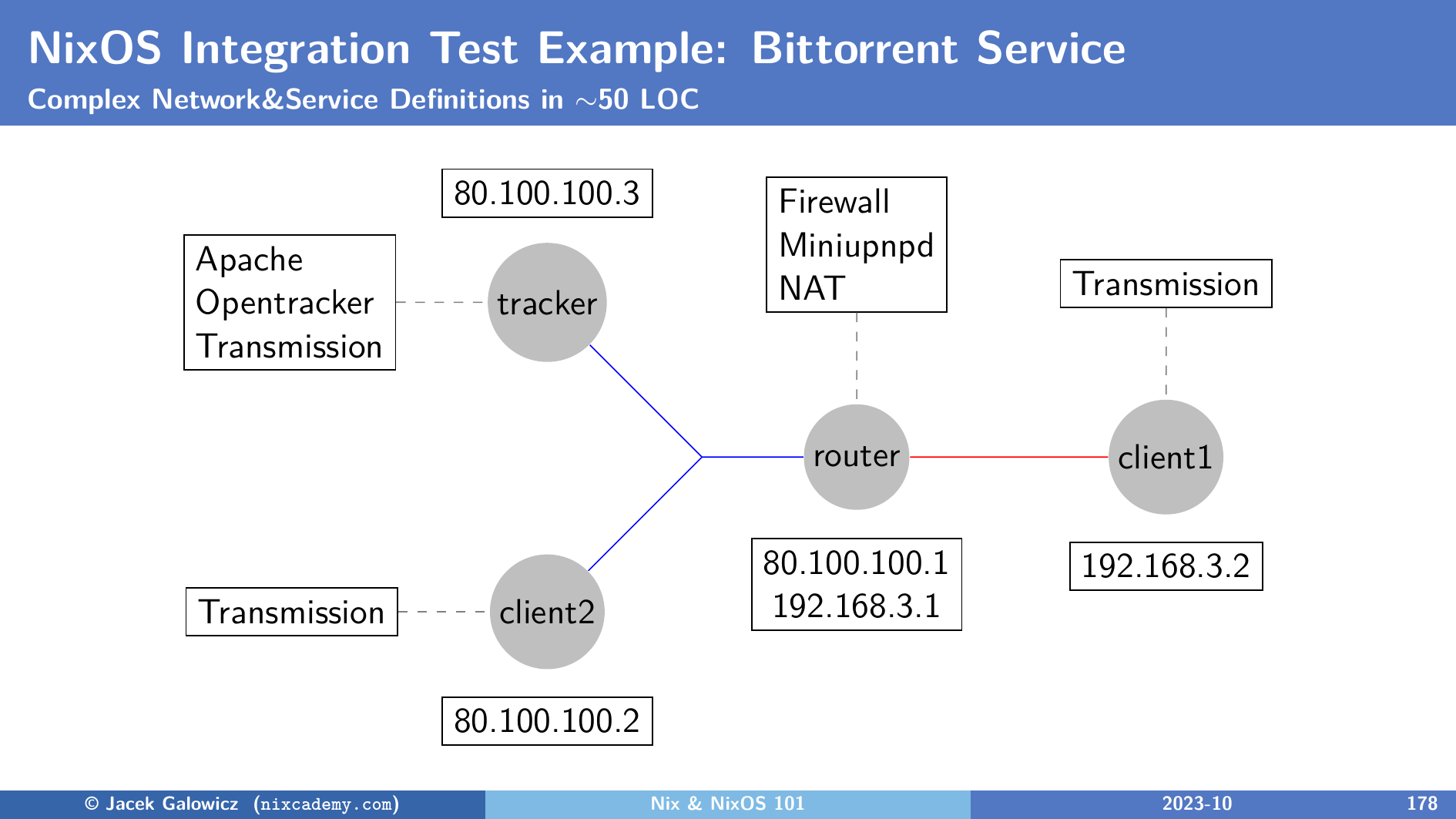
Another interesting real-life example is the Bittorrent test in nixpkgs which uses the following network configuration: